Samstag, 8. Mai 2010
8. Mai 2010
OpenOffice.org is able to export office files to the PDF file format. I created with Andre a new java project on Sourceforge.net that uses OpenOffice.org in the headless mode from the command line to convert files to the PDF file format. Therefor it uses the UNO framework of OpenOffice.org
You can create this PDF files with the options that are in OpenOffic.org available inside the PDF dialog, i.e. you can create PDF/A.
Our java application is able to work multiple files in one go.
Visit our little project on Sourceforge.net:
http://sourceforge.net/projects/ooopdfconverter/.
We have also a little home page for this project:
http://sourceforge.net/apps/phpwebsite/ooopdfconverter/index.php
There is a first version of the OOoPDFConverter available.
You can create this PDF files with the options that are in OpenOffic.org available inside the PDF dialog, i.e. you can create PDF/A.
Our java application is able to work multiple files in one go.
Visit our little project on Sourceforge.net:
http://sourceforge.net/projects/ooopdfconverter/.
We have also a little home page for this project:
http://sourceforge.net/apps/phpwebsite/ooopdfconverter/index.php
There is a first version of the OOoPDFConverter available.
Kategorie OOoPDFConverter |
Samstag, 10. April 2010
10. April 2010
Today I updated three Typo3 instances to version 4.3.3. I did it first for my test installation on my laptop. Because every thing went fine I made this changes to my test instance on the server of our association (OpenOffice.org Deutschland e.V.) and to the beta instance of the LinuxTag e.V. Now we can work further on that instance to get it asap to the productive instance.
Kategorie Typo3 |
Donnerstag, 18. März 2010
18. März 2010
I installed Typo3 on my local machine and made my first steps. Then I started with TypoScript and created a sample template with the logo of the association Open Office.org Deutschland e.V.
There are some issues left. I'll create a footer in the next days and fill the box on the right with different content.
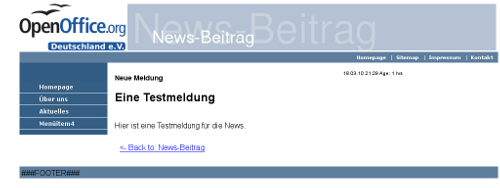
There are some issues left. I'll create a footer in the next days and fill the box on the right with different content.
Kategorie Typo3 |
Montag, 8. März 2010
8. März 2010
Today I worked a bit with Typo 3, installed some extensions and updated my local version from 4.2.x to 4.3.2. Every thing worked and the database is now up to date.
I'm able now to work with the new version and start to create a more sophisticated template in the next days.
I'm able now to work with the new version and start to create a more sophisticated template in the next days.
Kategorie Typo3 |
Sonntag, 7. März 2010
7. März 2010
Auf der Cebit 2010 in Hannover habe ich am 6. März im Forum Open Source eine Präsentation mit dem Titel "Mehr drin! Extras für Ihr OpenOffice.org" gehalten. Darin habe ich aufgezeigt, warum Extensions sinnvoll sind, welche Arten es gibt und wie sich OpenOffice.org so um weitere Funktionen ergänzen lässt. Ich habe dann die Webseite für Extensions gezeigt, erläutert, wie man dort nach der gewünschten Extension suchen kann und wie sich gefundene Erweiterungen in OpenOffice.org installieren lassen.
Ich bin danach auf einige aus meiner Sicht sehr nützliche Extension eingegangen, zu denen auch Vorlagen-Extension gehören. Dies leitete zu dem weiteren Unterthema meiner Präsentation über, dem Hinzufügen von Vorlagen zu OpenOffice.org. Diese lassen sich auch einzeln von einer speziellen Webseite des Projektes herunterladen und mit Bordmitteln für das Programm bekannt machen. Danach lassen sie sich für neue Dokumente als Vorlage verwenden.
Zum Abschluss meiner Präsentation habe ich noch Informationen zum Erstellen von Non-Code-Extension gegeben. Dabei habe ich dargestellt, wie einfach es ist, sich eine eigene Vorlagen-Extension mit einem verfügbaren Extension-Template zu bauen.
Meine Präsentation im PDF-Datei-Format finden Sie hier.
Ich bin danach auf einige aus meiner Sicht sehr nützliche Extension eingegangen, zu denen auch Vorlagen-Extension gehören. Dies leitete zu dem weiteren Unterthema meiner Präsentation über, dem Hinzufügen von Vorlagen zu OpenOffice.org. Diese lassen sich auch einzeln von einer speziellen Webseite des Projektes herunterladen und mit Bordmitteln für das Programm bekannt machen. Danach lassen sie sich für neue Dokumente als Vorlage verwenden.
Zum Abschluss meiner Präsentation habe ich noch Informationen zum Erstellen von Non-Code-Extension gegeben. Dabei habe ich dargestellt, wie einfach es ist, sich eine eigene Vorlagen-Extension mit einem verfügbaren Extension-Template zu bauen.
Meine Präsentation im PDF-Datei-Format finden Sie hier.
Kategorie OpenOffice.org |