Montag, 17. Mai 2010
17. Mai 2010
I worked on a new website about the options of the java application OOoPDFConverter. The site covers now the current options of OOoPDFConverter and describes the default value of all options.
I think the information are in better shape now and the user could get every piece of information he need to use this application.
You can find the new page here.
I think the information are in better shape now and the user could get every piece of information he need to use this application.
You can find the new page here.
Kategorie OOoPDFConverter |
Samstag, 15. Mai 2010
15. Mai 2010
I uploaded a new version of the java command line application OOoPDFConverter to the project page. This version covers the option to export selected pages of the original document. You can find a short explanation of this feature on the website of the project. Enjoy the new version of the application and share your experience with us ;-)
You can download the new version using this direct link.
You can download the new version using this direct link.
Kategorie OOoPDFConverter |
Samstag, 8. Mai 2010
8. Mai 2010
OpenOffice.org is able to export office files to the PDF file format. I created with Andre a new java project on Sourceforge.net that uses OpenOffice.org in the headless mode from the command line to convert files to the PDF file format. Therefor it uses the UNO framework of OpenOffice.org
You can create this PDF files with the options that are in OpenOffic.org available inside the PDF dialog, i.e. you can create PDF/A.
Our java application is able to work multiple files in one go.
Visit our little project on Sourceforge.net:
http://sourceforge.net/projects/ooopdfconverter/.
We have also a little home page for this project:
http://sourceforge.net/apps/phpwebsite/ooopdfconverter/index.php
There is a first version of the OOoPDFConverter available.
You can create this PDF files with the options that are in OpenOffic.org available inside the PDF dialog, i.e. you can create PDF/A.
Our java application is able to work multiple files in one go.
Visit our little project on Sourceforge.net:
http://sourceforge.net/projects/ooopdfconverter/.
We have also a little home page for this project:
http://sourceforge.net/apps/phpwebsite/ooopdfconverter/index.php
There is a first version of the OOoPDFConverter available.
Kategorie OOoPDFConverter |
Samstag, 10. April 2010
10. April 2010
Today I updated three Typo3 instances to version 4.3.3. I did it first for my test installation on my laptop. Because every thing went fine I made this changes to my test instance on the server of our association (OpenOffice.org Deutschland e.V.) and to the beta instance of the LinuxTag e.V. Now we can work further on that instance to get it asap to the productive instance.
Kategorie Typo3 |
Donnerstag, 18. März 2010
18. März 2010
I installed Typo3 on my local machine and made my first steps. Then I started with TypoScript and created a sample template with the logo of the association Open Office.org Deutschland e.V.
There are some issues left. I'll create a footer in the next days and fill the box on the right with different content.
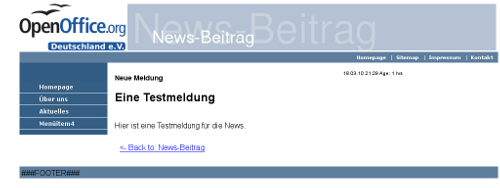
There are some issues left. I'll create a footer in the next days and fill the box on the right with different content.
Kategorie Typo3 |